The Holiday House Kit

The marketing kit for your holiday home.

A website of its own, print-ready cards and assets, and a social media plan, made from the same source. Everything you need to be seen, to look your best and to fill your calendar. No booking fees and no commission: guests book through the sites you choose, or send you a request on your own site.

One-off build from , then a month for hosting and upkeep.

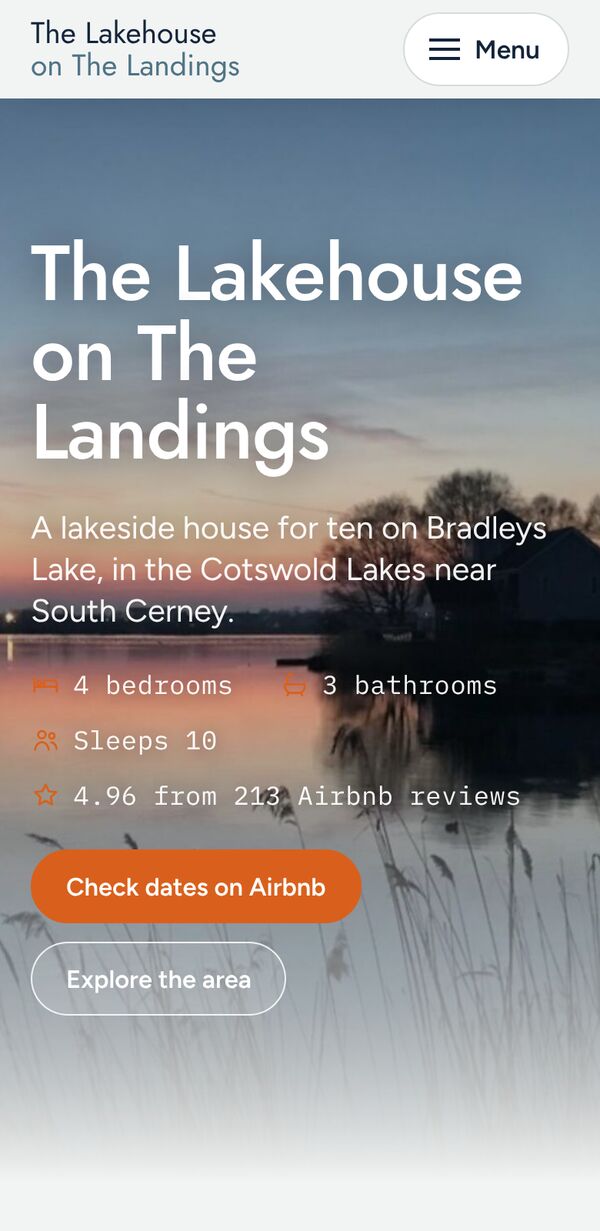
The Lakehouse on The Landings home page on a phone, with the house name over a sunset lake photo and a Check dates and book button

The wild coast, New Zealand

Your listing can't hold everything you know.

One template, one page

Every listing on a booking site looks the same. Your photos and a block of text are all a guest sees before they book.

The same questions

Parking, check-in, the nearest shop, whether the dog can come. Guests ask them stay after stay, and you answer them in messages.

Local knowledge in a long message

Your favourite walk, the pub that takes bookings, the village worth the drive. It sits in a welcome message most guests skim once.

One kit. Three parts.

Everything that improves how your property is found, presented and booked, built from one set of your photos and words, so every part looks and sounds like your house.

A website of its own

Your rooms, an area guide, house rules and a day planner for guests. It becomes the link you use everywhere: your Instagram bio, your Google profile, your listings and your emails. See the demo site.

Cards and assets

Print-ready QR cards for the bedside and the kitchen, a business card, a visual guide to your site and a one-page feature sheet. Your guests reach the site with nothing to type. See the cards.

A social media plan

90 days of Instagram posts with the captions, hashtags, photographs and calendar, written from your own site. See the plan.

No fees, no commission

We take nothing from your bookings. You pay once for the build, then a small monthly hosting fee for the site.

Book where you like

Send guests to as many booking sites as you use, each with its own Book button. Or let guests send a booking request on your own site and reply from your inbox.

Choose what you need

Every package includes the website, the visual guide and the feature sheet. Add the social plan and the cards to any package.

The Lakehouse on The Landings

A house for ten on Bradleys Lake in the Cotswolds, hosted by Noel and Karen. This is the site we built for them.

4 BEDROOMSSLEEPS 104.96 FROM 213 AIRBNB REVIEWS
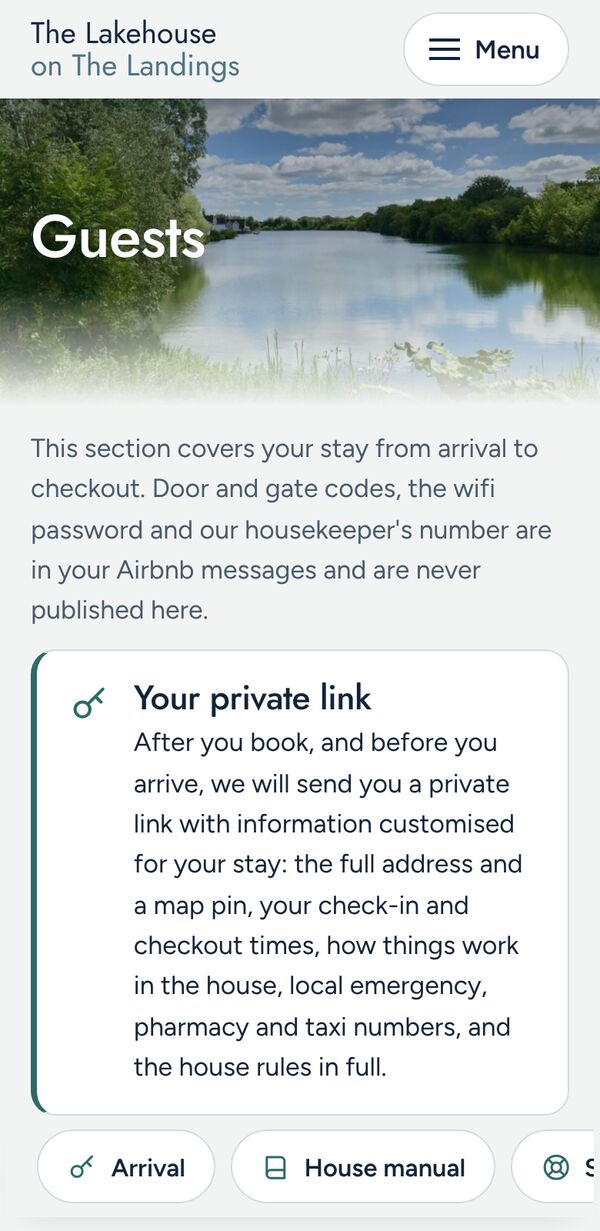
Guests page on a phone, explaining the welcome message sent before arrival
Guests: arrival, rules, departure
lakehouselandings.netlify.app/#explore
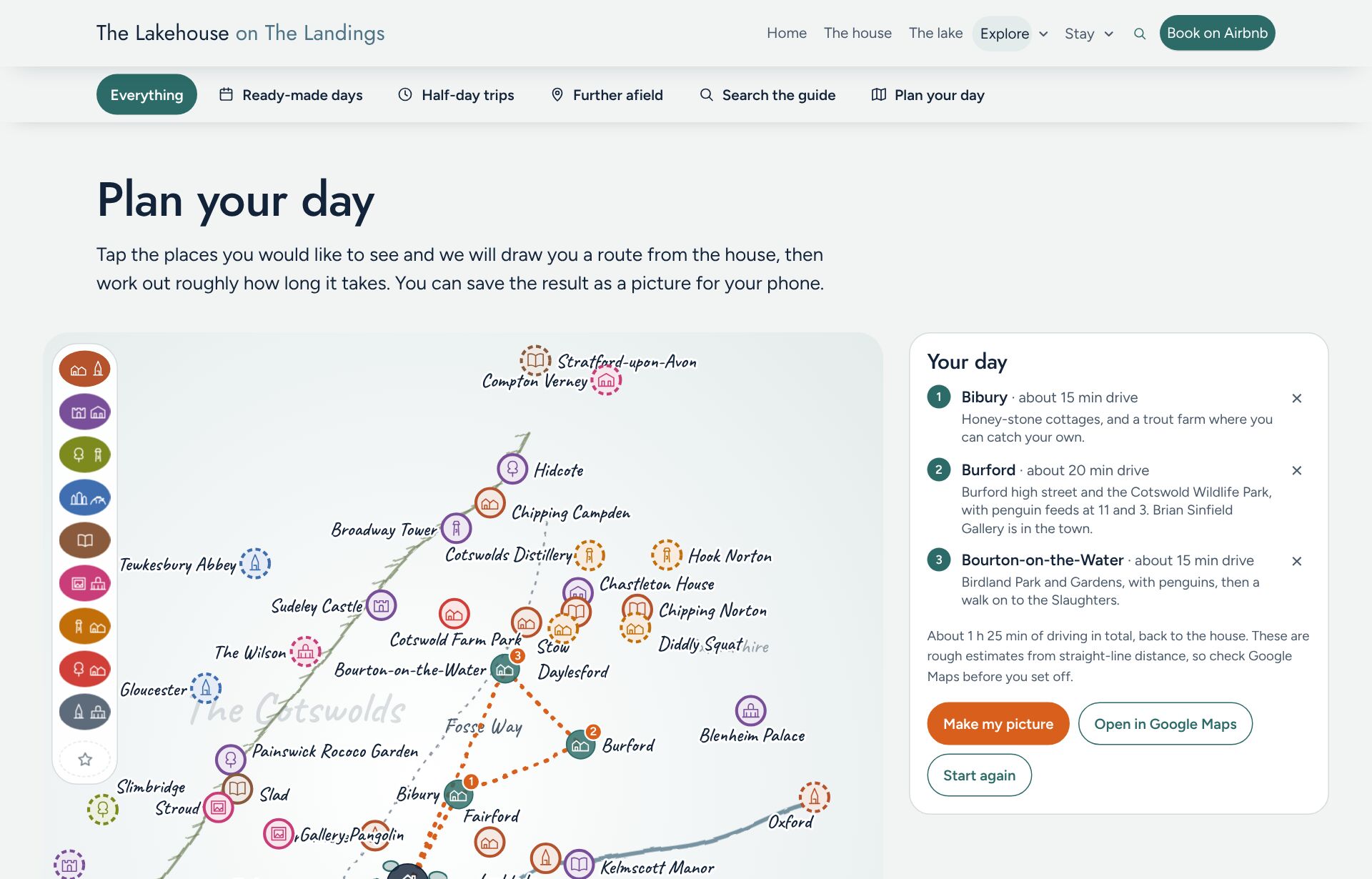
Plan your day: an illustrated map of the Cotswolds with a route from the house to Bibury, Burford and Bourton-on-the-Water, and a Your day panel with drive times
Plan your day: guests tap places, the site draws the route and the drive times
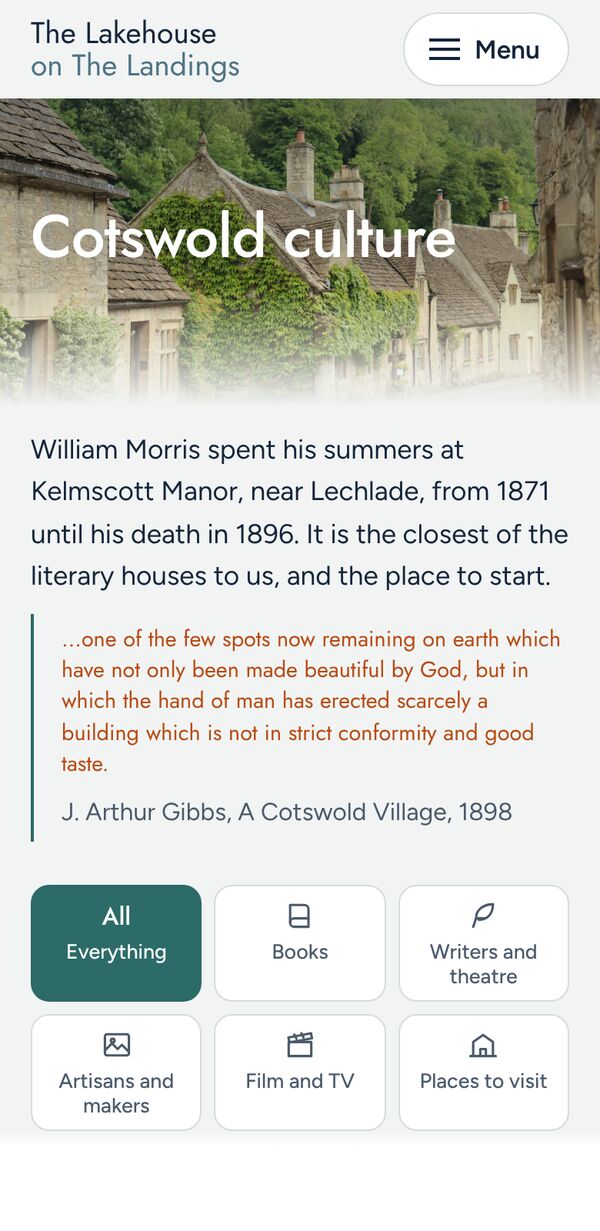
Cotswold culture page on a phone with filters for books, writers, makers and film
Culture: books, makers, film

What your guests get

A site that works on the phone in their pocket, before the trip and during it.

  • The house, room by room

    Photos that open full screen, every bedroom, and a floor plan they can zoom.

  • A guide they can search

    Your places to eat, walk and visit, filtered by what they like: foodies, families, culture, art.

  • Plan your day

    Tap places on a map of your area. The site draws a route from the house and estimates the driving.

  • Rules and arrival steps

    Parking, house rules, safety and checkout, in one place. Door codes and wifi stay in your private messages.

  • Their stay, as a PDF

    Guests choose what they want, from the house and the area to the day they planned, and save their own PDF guide on their phone, to keep or share. Nothing is sent anywhere. In the Guide and Signature packages. See a sample from the Lakehouse.

  • A way to reach you

    A form that sends to your inbox, for a question or a booking request with dates and party size. And a WhatsApp button if you want one.

  • Your reviews, in one place

    A pick of the reviews from your listings on the home page, and a page of their own with the rest, so guests can read them without leaving.

  • Their time and yours

    A small clock on the header shows the guest's own time beside the time at the house. Handy for planning an arrival from the other side of the world.

Answers before they ask.

The practical questions guests send you, answered on the site. Which package includes each one is listed under Packages.

  • At a glance

    Sleeping numbers, parking, heating, kitchen, laundry, check-in style and pets in one scan, so a guest knows the basics before they read anything else.

  • Stay your way

    Tiles for families, dog owners and people working away. Each opens a short panel written for them, and the dog panel lists dog-friendly places from your guide.

  • Getting here

    Drive times from the cities your guests come from, how to arrive by train, and where to park.

  • Walks, water and wildlife

    Outdoor cards for the walks, any paddling and the birds near the house, each with a button that opens your guide already filtered.

  • Through the year

    Four seasonal cards, so guests can see what your area is like when they are there.

  • Share or print their day

    Guests copy a link to the day they planned, and whoever opens it sees the same plan. They can also print it.

What you get

Fewer messages, and a link you can be proud to send.

  • Fewer repeat questions

    The answers are on the site, so you send a link instead of writing the same reply again.

  • A link for everywhere else

    Your Instagram bio, your Google profile, a card in the house, an email to past guests.

  • Better-prepared guests

    Guests who know where to park, when the pub stops serving and what to do on a wet day tend to leave better reviews.

  • Bookings your way

    A Book button for each booking site you use, or a request form on your own site. No booking fees and no commission from us.

  • A guide to your site, and a one-page sheet

    A short visual guide to what your site does, and a one-page feature sheet to keep, print or send to a co-host. Both come with every package. See a sample visual guide and a sample feature sheet.

  • Kept up to date

    Hosting includes a check of opening hours each season, and small changes when you ask.

Three packages

One-off build, paid at order. Prices shown in pounds.

Showcase

The house, the rules, a local guide and a way to ask you.

  • Home page with a photo slideshow
  • The house: every room, photos, floor plan
  • Who the house is perfect for
  • Area guide of up to 30 places, searchable, with filters
  • Questions and answers
  • Ask a question or request a booking form, to your inbox
  • A Book button for each booking site you use
  • Guests: arrival, house rules, checkout and at least 10 nearby essentials
  • Search across the whole site
  • At a glance: the practical answers in one scan
  • Getting here: drive times, the nearest station and parking
  • Your reviews from your listings, on the home page and a Reviews page
  • Guest time and house time clock
  • A visual guide and a one-page feature sheet for your site
  • Built for phones first

Private preview in working days
Guide

The Lakehouse model, sized for most houses.

  • Everything in Showcase, plus
  • Area guide of up to 40 places
  • Ready-made days and half-day trips
  • Plan your day map with routes and drive times
  • Guests can copy a link to their planned day, or print it
  • Make my guide: guests choose the sections and save or share their own PDF guide
  • Through the year: four seasonal cards
  • Walks, water and wildlife cards, linked to your guide
  • Stay your way: panels for families, dog owners and people working away
  • Extras: local chefs, taxis, spas and more

Private preview in working days

Signature

The full Lakehouse build.

  • Everything in Guide, plus
  • Area guide of up to 60 places, with further afield
  • Culture: books with an Amazon button, writers, film and TV, makers
  • Local secrets: the history of your area
  • WhatsApp button
  • A leaving pack of your words, guide and photos, if you ever leave

Private preview in working days

Compare the packages on a real home. Four sample holiday homes, each built three times. Switch between Showcase, Guide and Signature and see what each one adds.

See the sample homes

Hosting and upkeep

Hosting, your question form, a seasonal check of opening hours and small edits. Starts when your site goes live, billed in the currency of the country your property is in. Cancel any month.

a month

A social plan for your first 90 days.

90 days of Instagram posts, written from your own site, so you never start from a blank page. Add it to any package.

first 90 days
each later season

Tick "Add the social plan" on any package above. Your brief then asks a few extra questions: where you post, how you like to be on camera and what must never show.

Two samples. The Lakehouse plan is for The Lakehouse on The Landings in the Cotswolds, November 2026 to January 2027, in UK English. The Somers plan is for Somers Dunescape on the Mornington Peninsula, October 2026 to January 2027, in Australian English. Both are shown with the hosts' permission.

Cards for the house.

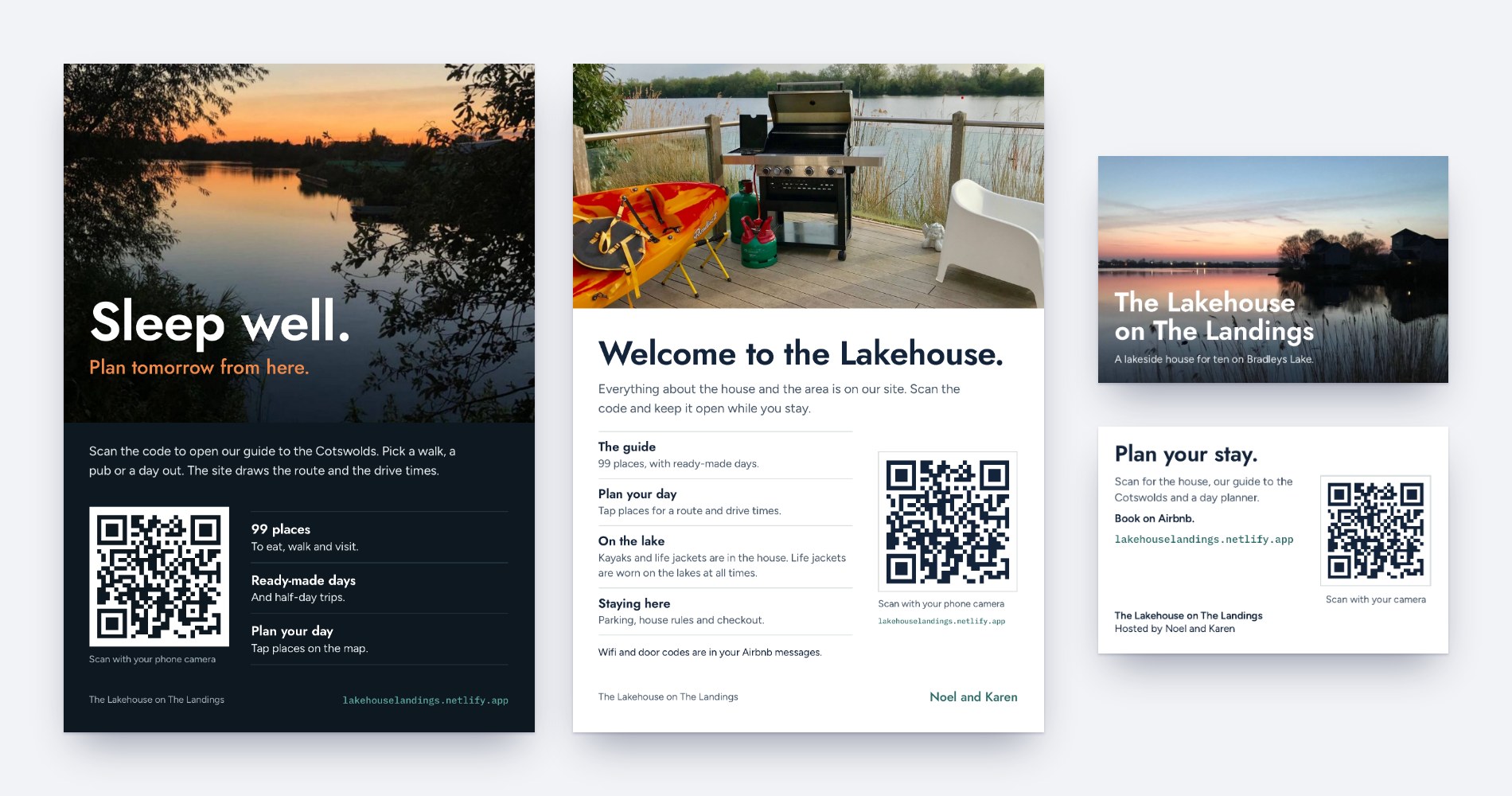
A QR code on a card gets guests to your site with nothing to type. We design the cards from your site: your photos, your house name and your colours. You get print-ready files to print wherever you like. Add them to any package.

Business cards

for the print-ready design

Double sided. Your photo and house name on the front. On the back, a QR code, a short line and your host names.

85 × 55 mm. Leave one with each booking, put them in the welcome basket and hand them out locally.

A5 cards for the house

for both print-ready designs

One for each bedside table and one for the kitchen bench. The bedside card helps guests plan tomorrow. The kitchen card covers the house: the guide, the day planner and your rules.

148 × 210 mm, one side. Two designs.

Each QR code points at your site. We set it to your final address, so order your cards once your domain is decided. Every file comes with 3 mm bleed for your printer.

Refer a friend. You both get something back.

Know someone with a holiday home who would like a site of their own? When they order, they name you in their brief. Once their site is live and they have made their second hosting payment, of hosting is free for them. If you host a site with us, is free for you too. If you don't, we send you a gift card.

  1. Tell them about us

    Send them the link to this page. They don't need a code.

  2. They name you

    The brief has one optional question: "Did someone send you to us?" They give your name and email, and say whether you have a site with us.

  3. You both get something back

    After their second hosting payment we take a month off their hosting. A host with us gets a month off too; anyone else gets a gift card by email. Refer more friends and it adds up.

A referral counts once their site is live and they have made their second hosting payment. You need active hosting to receive a free month. Credits stack: each referral adds another free month, up to 12 credits in any 12 months, and each lasts 12 months. The free month is a credit on hosting only and is not paid out in cash. The gift card is for someone without a site with us, with the same limit. If you manage a property for its owner, tell them you receive a gift card for the referral.

Manage holiday homes for owners? Ask us about a business account.

How it works

  1. Choose and pay

    Pick a package and pay securely by card.

    ABOUT 2 MINUTES
  2. Fill in the brief

    Tell us how guests book, paste your listing link if you have one, and add your welcome message. We read them, so the brief asks only what we can't find.

    ABOUT 10 MINUTES FOR THE ESSENTIALS
  3. We build, you review

    We write the guide, set up the map and send you a private preview. One round of changes is included.

    YOUR BUILD STARTS WHEN THE BRIEF IS READY
  4. Go live

    Your site goes live, with a short visual guide and a one-page feature sheet. Share the link with guests before and after they book.

    HOSTING STARTS HERE

What we need from you

Most of it you already have. The four essentials start your build, once we have checked them. Anything else you skip, we write for you and you check it in the preview.

How guests book
Links to the booking sites you use, or a request form on your site, or both
Essential
Your welcome message or house manual
Paste it in as it is
Essential
Photos
Your listing photos, or a link to a better set
Essential
Who the house is perfect for
Tap the ones that fit
Essential
Your listing link
If you have one, we take the rooms, amenities and description from it
Optional
Your five favourites
A walk, a pub, a café, a quiet spot, and what to avoid
Optional
Questions guests always ask
Tick from a list
Optional
House rules
Tap, then add your own
Optional
Local services to include
Chefs, groceries, taxis, spa, childcare
Optional
The look
Pick a palette, or let us match your photos
Optional
Your domain
One you own, one you want, or ours
Optional

See it before you pay. Open the brief, switch features on and off, and see how little there is to do. Nothing is saved and there is nothing to sign up for.

Try the brief

We never ask for door codes, key-safe numbers or wifi passwords. They stay in your private messages to guests.

Questions

How do guests book?

Your way. Give us a link for each booking site you use and each gets its own Book button. Or guests send a booking request on your own site, with their dates and party size, and you reply from your inbox. You can offer both.

Do you take a fee or commission on bookings?

No. We never touch your bookings. You pay for the build once, then a small monthly fee for hosting and upkeep.

Do I need to be on a booking site?

No. If you take bookings yourself, guests can send a request on your site. If you are on one or more booking sites, link to them all.

What about door codes and wifi?

They never go on the site. The Guests page tells guests they come in your welcome message before they arrive.

Do I need my own domain?

No. Your site can go live on an address we provide. If you own a domain, or want one, we point it at the site. You register and keep the domain in your own name.

Can I leave out features I don't want?

Yes. Your brief has a step where you switch off anything in your package you don't want. We leave it out and we don't ask you about it. Switching a feature off doesn't change the price. You can try the brief first.

Can I change things after it goes live?

Yes. Small edits are part of hosting: a new restaurant, a changed rule, a new photo. Larger additions, such as a new page, we quote for.

Who writes the guide?

We do, from your favourites and our own research. We check opening hours before launch and each season after, and mark anything we couldn't confirm so guests check before they go.

What if I don't finish the brief?

Your build starts once the four essentials are in and we have checked them. We send a reminder if it's still waiting after a day, and again after three.

Do you post the social plan for me?

No. We write and design the plan and you post it. We don't reply to comments, run ads or promise bookings.

How does refer a friend work?

Anyone can refer a host. When they name you in their brief, their site goes live and they have made their second hosting payment, they get a free month of hosting. You get a free month too if you host a site with us, or a gift card if you don't. The full rules are in the terms.

Is there a refund?

In full until we email you "Your build has started". After that, only where the law gives you a right to one. The full terms are here.

Give your holiday home everything it needs.

Choose a package, add the social plan or cards if you want them, fill in the brief, and we take it from there.

Questions first? Email us at

hello@authored.com.au
1 / 11
← → to move · Esc to leave